
https://github.com/deepseek-ai/deepseek-harness
1. 安装 和更新
npm i -g @deepseek-ai/dsh2. dsh开发
git clone https://github.com/deepseek-ai/deepseek-harness.git
cd deepseek-harness
pnpm install
pnpm run build
pnpm dsh web如何调试
pnpm run dev:web —— 一条命令搞定,构建内嵌了,不用手动先 build局域mq
3. 插件开发
3.1 dsh-better-sidebar
https://github.com/omdsh-dev/DSH-better-sidebar
# 1. 构建插件源码
cd G:/others/DSH-better-sidebar
pnpm install && pnpm build

# 2. 编辑 C:\Users\pc\.dsh\profiles\web\package.json,把依赖指向本地:
#    "dsh-better-sidebar": "link:G:/others/DSH-better-sidebar"
#    (dsh.profile.bundles 里的 "dsh-better-sidebar" 条目保留不动)

# 3. 重装 profile 依赖
cd ~/.dsh/profiles/web && pnpm install

# 4. 验证组合树 + 启动
pnpm dsh --profile web --dump-config   # 确认 better-sidebar 行来自新包
pnpm run dev:web4. dsh源码
deepseek-harness/
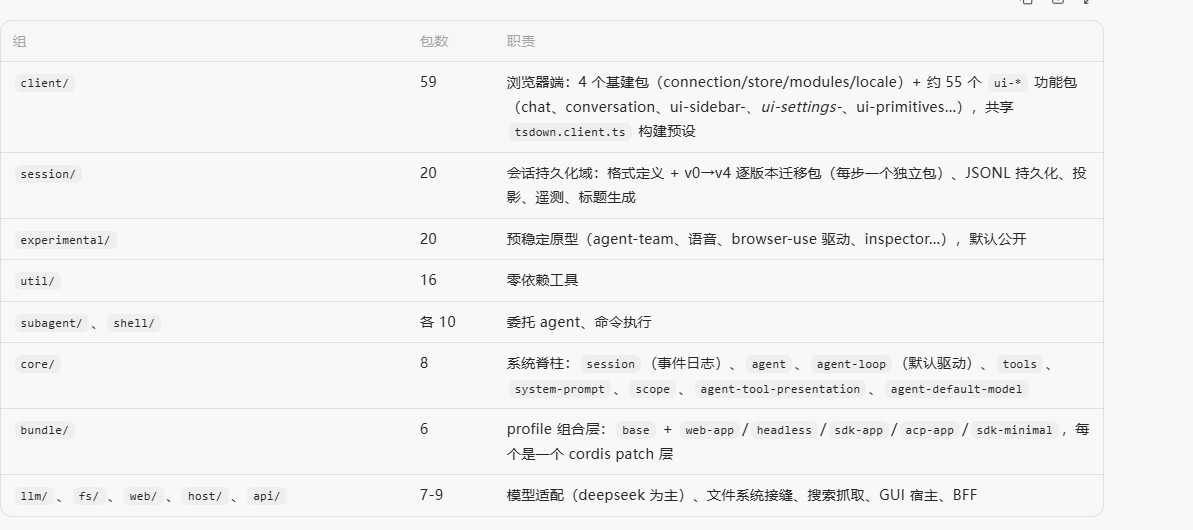
├── packages/ 307 个包,按能力域分 60 组(核心)
├── apps/ cli / web / desktop / desktop-host(运行形态)
├── vendor/ Cordis 框架家族源码(固定 pin,rescope 处理)
├── python/ Python SDK + 运行时 wheel
├── native/ @deepseek-ai/node-addon-system 原生模块源码
├── docs/ 文档(含自动生成的目录)+ website/(VitePress 投影)
├── scripts/ ~80 个 gen-/verify- 门禁脚本 + run-gates.ts
├── benchmarks/ 性能门禁(长会话浏览器、session 打开、流重连等)
├── snapshots/ 无 key 录制会话回放夹具
└── .agents/ agent 工作流:notes/(决策记录)+ skills/(本仓库专属技能)
pnpm run dev:web
  │
  ├─ ⓪ 全量构建(pnpm run build,--skip-build 可跳过)
  ├─ ① tsc -b tsconfig.client.json --watch        ← 常驻子进程
  ├─ ② tsdown watch(约 70+ 个 client 包)          ← 脚本进程内
  ├─ ③ vite build --watch(apps/web/dist)          ← 常驻子进程
└─ ④ dsh web(Host 从源码启动) ← 常驻子进程Tsc -b tsconfig.clien.json
你改 packages/client/ui-xxx/src/foo.tsx
  → ① tsc watch:重编译该包 → lib/types/foo.js + foo.d.ts   ← 聚合工程只管调度,不产文件
  → ② tsdown watch:监听 lib/types 变化 → 重打包 lib/index.js / lib/client.js
  → ③ vite watch(若在壳的模块图里)→ apps/web/dist
→ Host webserver stat 轮询发现 bundle 变化 → 广播 rebuilt → 浏览器热加载程序入口
dev-web.ts:420  spawn: node --import tsx/esm apps/cli/src/bin.ts web
  └─ ① apps/cli/src/bin.ts        runCli() → parseDshArgs → mode 'profile'
       └─ ② apps/cli/src/profile-boot.ts   runProfile():组树 + Loader 挂载
            ├─ ③ packages/host/webserver/src/index.ts   createServer + listen  ← 真正的 HTTP 入口
            ├─ ④ packages/bundle/web-app/src/index.ts   FrontendStatic:服务 SPA dist
└─ 其余宿主插件(api gateway、sessions、tools、better-sidebar…)Profile 组合 apps/cli/src/profile-boot.ts——读 $DSH_HOME/profiles/web/package.json 的 dsh.profile.bundles,按序叠 patch 层:@deepseek-ai/dsh-base 的 patch → @deepseek-ai/dsh-web-app 的 patch → profile 自己的 cordis.patch.yml → home 层 → --patch 覆盖,然后启动 cordis Loader 把整棵插件树挂起来。